Every cat you meet gets a stamp
Snap the tabby on the wall outside the bakery and give it a name. You get a sticker, a passport page, and a pin on the shared world map.



From the photo to the map
The camera, the sticker, the passport page, the shared map, your stats, and your badges, in the order you meet them.
What the film shows, in order:
- Cat stickers drift in the dark. Every cat you meet gets a stamp.
- Capture. Photo in, sticker out. Point the camera at a cat. The phone cuts it off the background, so you keep the cat and leave the parked car behind. A long-haired tabby is photographed and lifts off the photo as a sticker.
- Passport. Every cat gets a passport page. Photo, name, date, place, and a machine-readable line across the bottom. The tabby, Reginald, opens from the catalog as a passport card.
- Shared map. Everyone’s cats, on one map. Pan to a city you have never visited. The cats other people found there are already on it.
- Stats. Where your cats came from. A world map shades every country you have found a cat in. 101 stamps, 24 countries.
- Purrfect Pro. Badges, and a streak to keep. Five categories, four tiers, and streaks that count the days you keep finding cats.
- Pawsport. Track every cat you meet. Free on iPhone and Android. 10% of Purrfect Pro goes to cat shelters.
Stickers, a shared map, and a passport for each cat
Photo in, sticker out
Point the camera at a cat. The phone cuts it off the background, so you keep the cat and leave the parked car behind.
- Shoot from the camera or pick a photo out of your gallery
- Subject detection runs on the device, with no upload to cut it out
- Give the cat a name, a type, and a line about it
- The app fills in the location from the photo or the phone
- Save any sticker as a PNG through the share sheet
A map you share with everyone else
Everyone looks at the same world map. Pan to a city you have never visited and the cats other people found there are already on it.
- Stickers sit where the cat was, clustered when they crowd
- Switch to a heat map to see where your collection is dense
- Tap a cluster to burst it into individual cats
- Coordinates round to roughly a kilometer before they are saved
- We review new stamps before they join the shared map
Every cat gets a passport page
Open a stamp and you get a passport page: photo, name, date, place, and a machine-readable line across the bottom.
- Five emoji reactions on any cat, yours or somebody else’s
- The catalog is a grid of every sticker you have collected
- Stats count your stamps by country and by US state
- A world map shades the countries you have reached
- Edit a stamp or delete it whenever you want
Badges and streaks, on Purrfect Pro
Purrfect Pro adds badges in five categories, four tiers to climb, and streaks that count the days you keep finding cats.
- Milestone, geographic, collection, streak, and special badges
- Bronze through platinum, each one worth points
- Daily, weekly, and monthly streaks with progress bars
- Unlimited stamps in place of the free cap
- 10% of every subscription goes to cat shelters
257 cats so far, in 31 countries
Every dot is a cat someone stamped in Pawsport. Pick a continent or a country to zoom in, or point at a dot to see how many cats are there. Yours goes on the same map.
- Cats stamped
- 257
- Countries
- 31
- Continents
- 6
- States and regions
- 114
- People collecting
- 61
Bigger dot, more cats in that spot
By country
- The two cats farthest apart are about 19,000 km from each other, one in Australia and one in the United States. That is close to opposite sides of the planet.
- Northernmost cat: Greenland, around 68.8°N.
- Southernmost cat: Australia, around 42.9°S.
Dots are rounded to about 11 km and merged when they share a spot, which is coarser than the app itself. Nobody’s street is on this map.
Numbers as of September 20, 2026.

The cat comes out of the photo
A photo of a cat on a wall is mostly wall. Pawsport cuts the cat off the background, puts a white sticker border around it, and that cut-out is what you see on the map, in your catalog, and on the passport card. Zoomed out, the map looks like cats.
- Take the shotFrame the cat in the viewfinder and tap the shutter, or pull one out of the photos you already have.
- It becomes a stickerYou get a sticker in the capture form, ready for a name and a note.
- Send it anywhereOpen a sticker full screen and share the PNG to Messages or Notes.
Cut-outs use the subject detection built into the operating system, which needs iOS 17 or later. On an older iPhone the stamp saves the photo as you took it.
Screenshots from the app
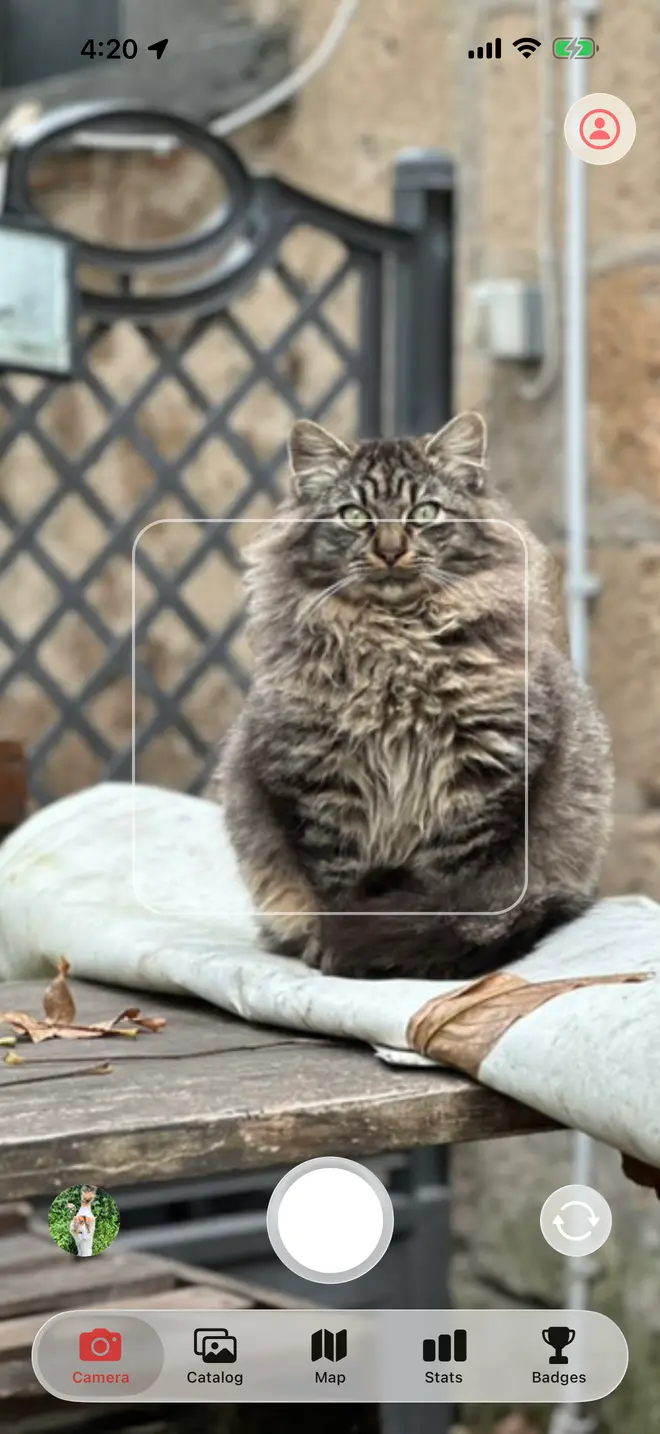
Spot a cat, take the photo
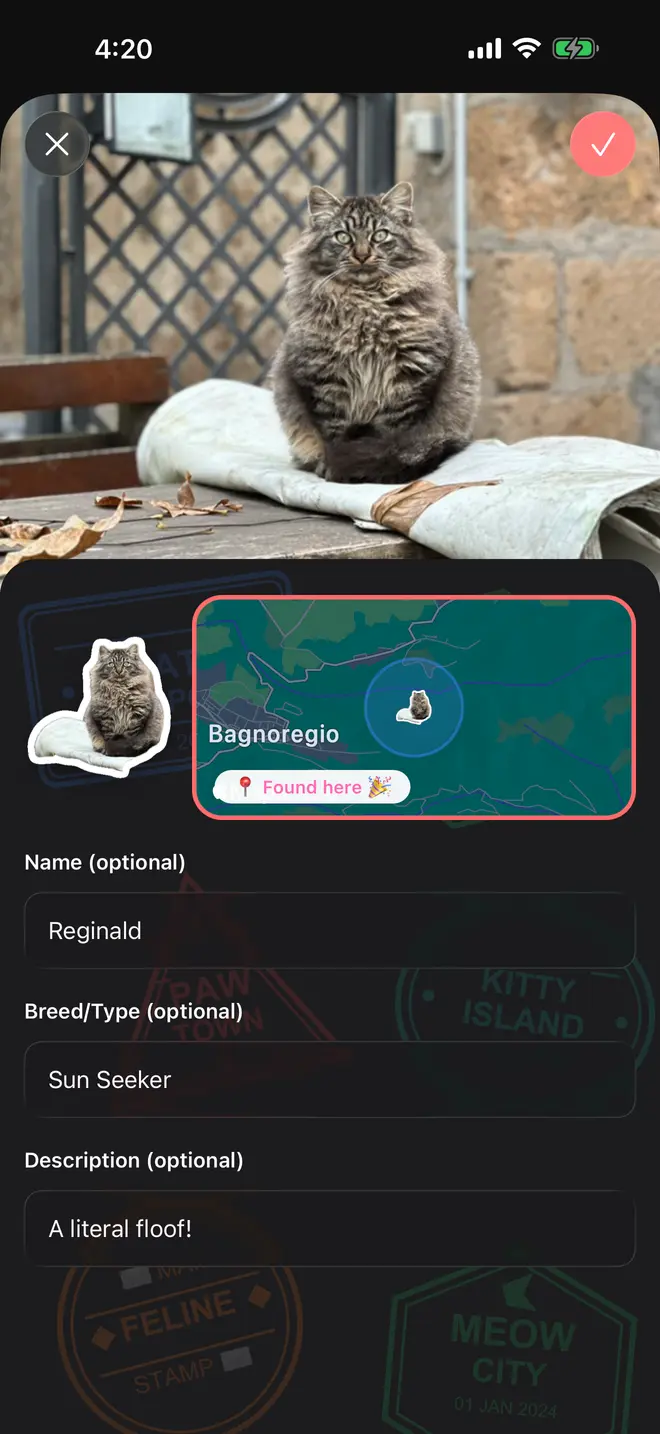
Name it, and it is stamped where you found it
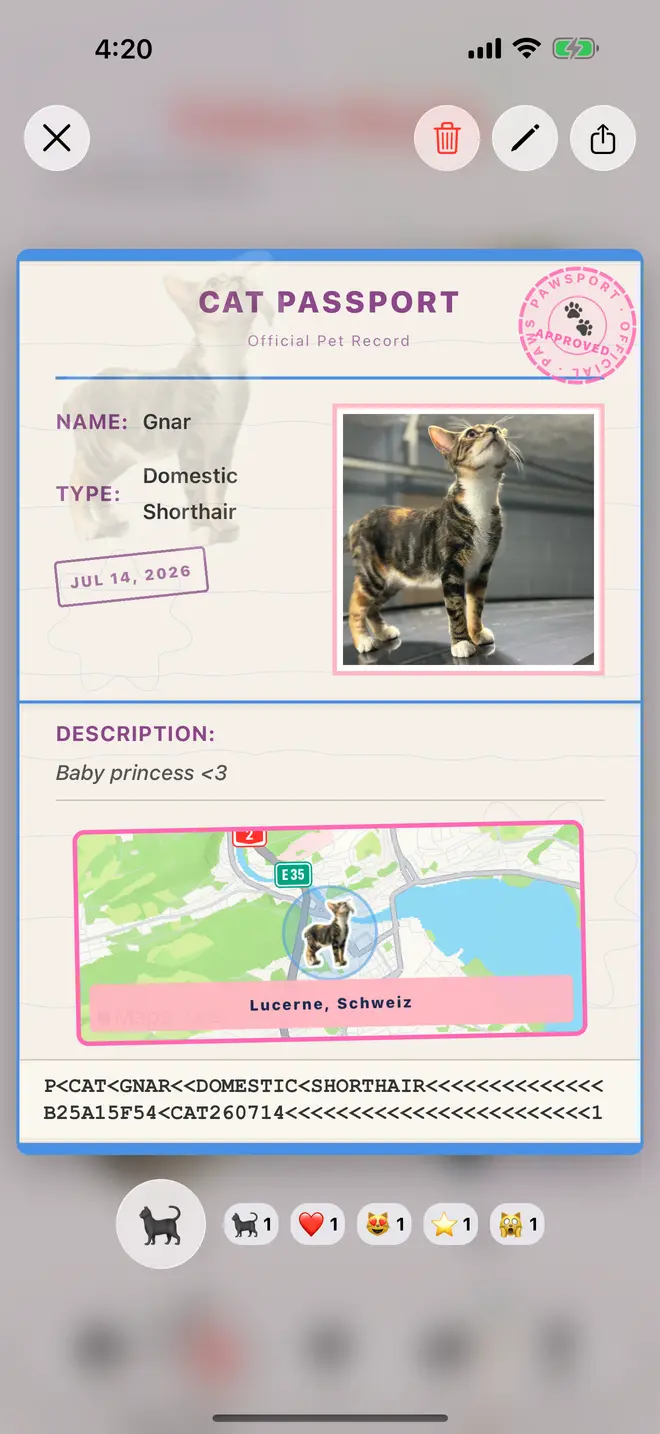
Each cat gets a passport stamp
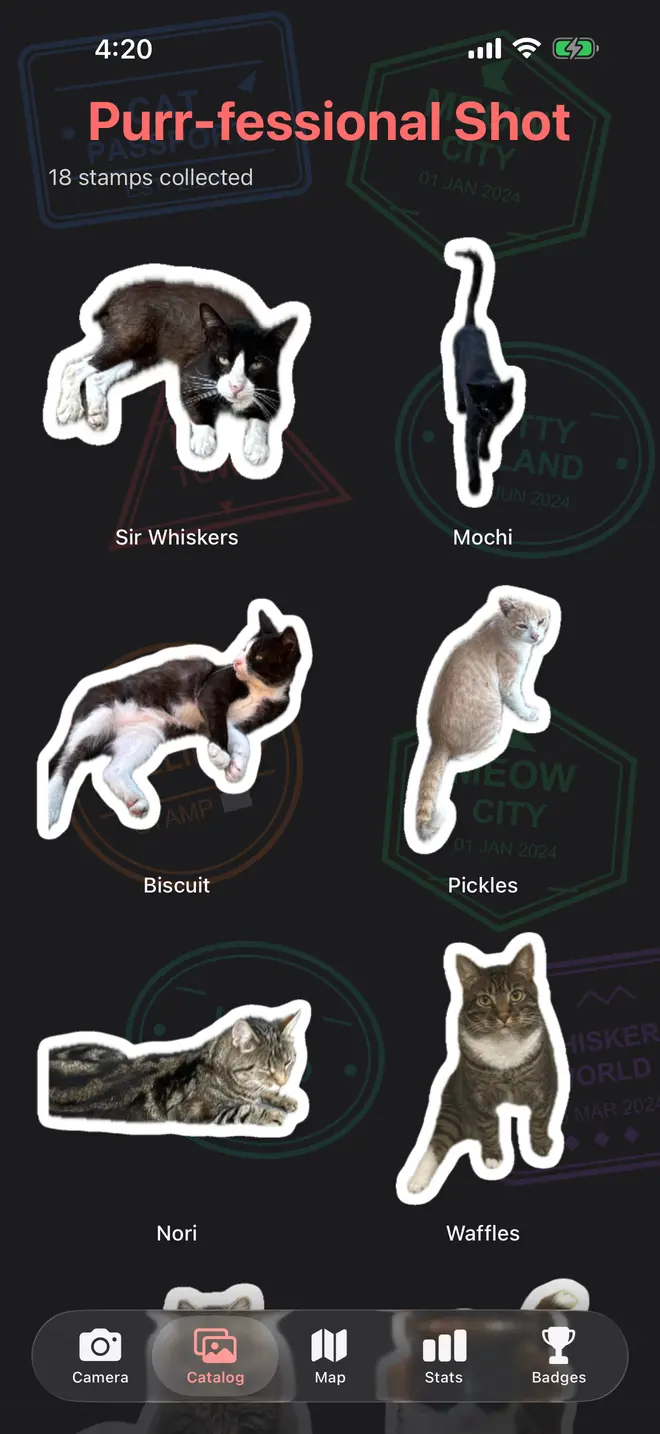
Your stickers, in a grid
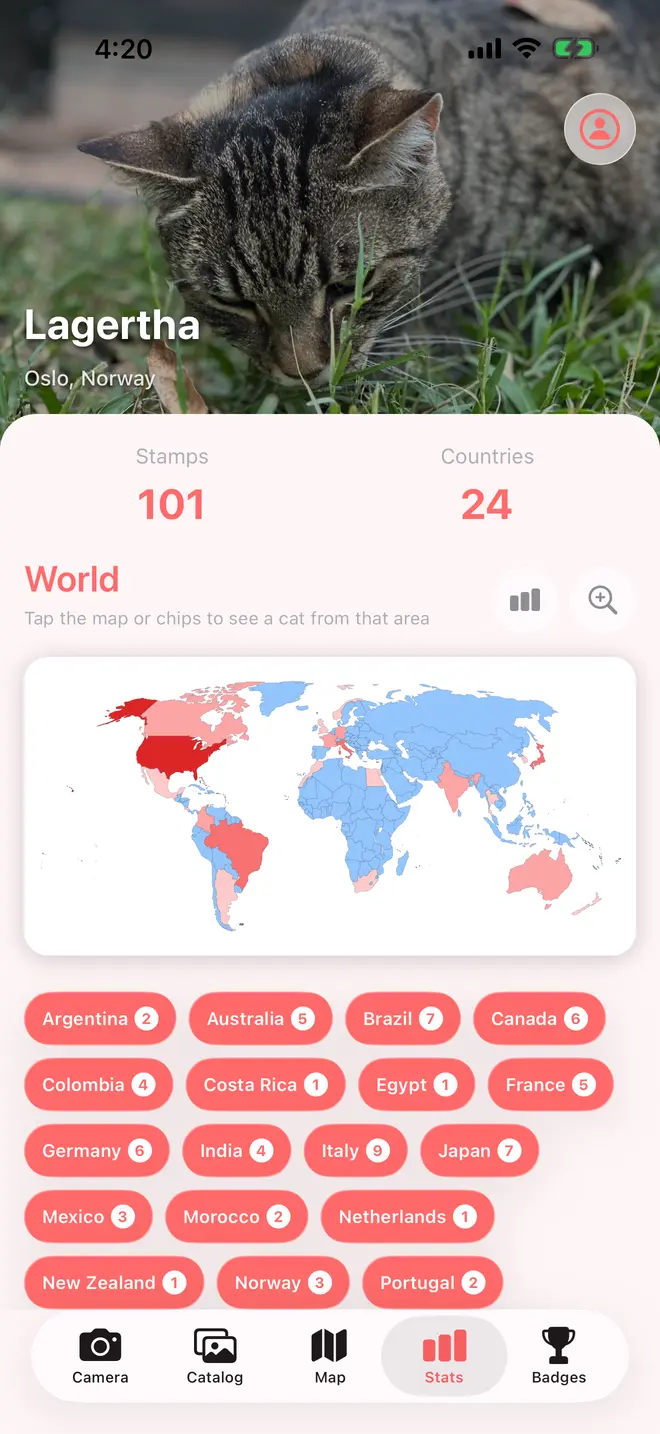
Countries your cats came from
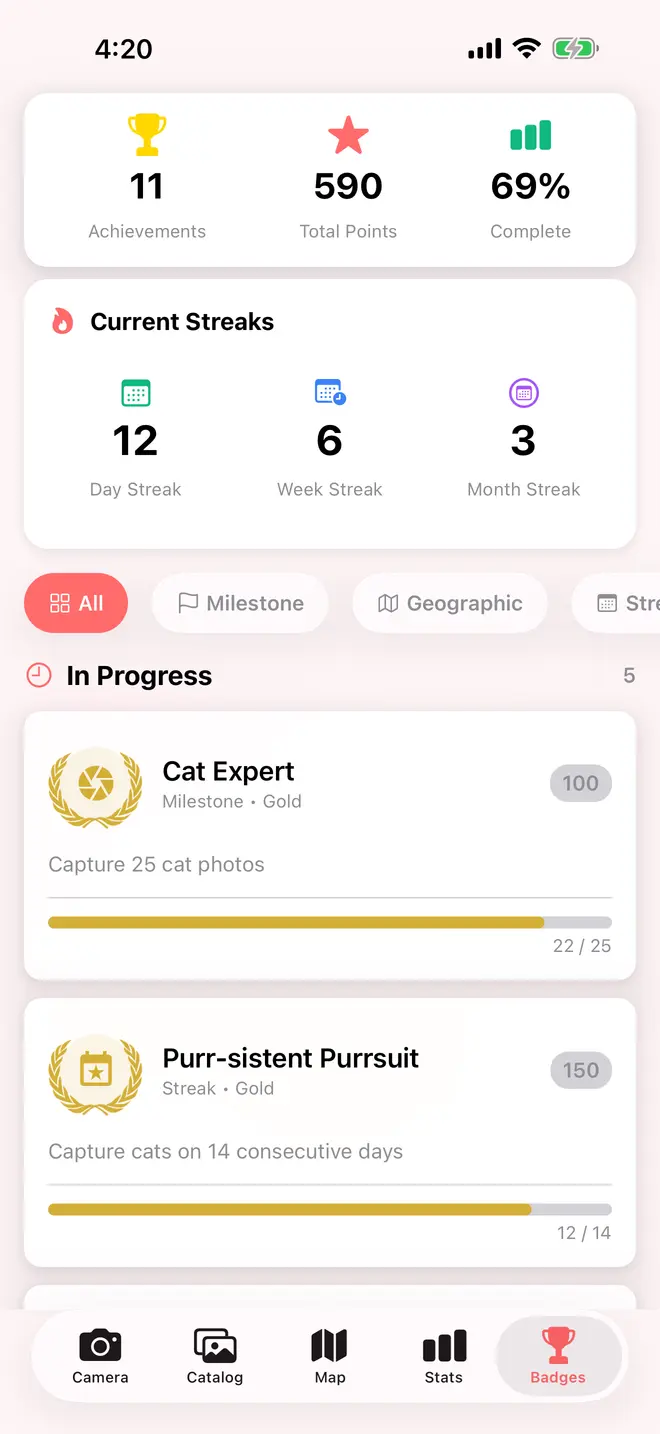
Badges and a streak if you keep going


No email needed for your first cat
Open the app and start as a guest, no email and no password. Guests get five stamps. Sign in with a link, Google, or Apple and the cap moves to thirty, and the cats you already found come with you. Purrfect Pro removes the cap and unlocks badges. 10% of what you pay goes to cat shelters and rescues.
Start as a guest
Five stamps, no account. Link an email, Google, or Apple later and the cats you already found follow you over.
Thirty on a free account
Signing in raises the cap and keeps your collection available if you get a new phone.
10% to shelters
Purrfect Pro comes monthly, yearly, or as a one-time lifetime unlock, and 10% of each goes to cat shelters.
Your photos and the rounded spot you took them live on our servers, so a new phone still has your collection. What we keep, who can see it, and how far we round the location is in our privacy policy.
Common questions
Do I need an account to start?
No. Tap through the intro and you are collecting as a guest. No email, no password. A guest account holds five stamps. Link an email, a Google account, or an Apple account later, and the cats you found as a guest carry over.
How many cats can I collect for free?
Five as a guest, thirty once you sign in. Purrfect Pro removes the cap. Your collection lives on our servers, so the count follows you to a new device.
Can other people see the cats I find?
The map is shared. Once we have reviewed a stamp, anyone else using the app can see its sticker, the name and note you gave it, and its rounded location. They can react to it. Your email address is never attached to it. Delete a stamp and it comes off the map with everything else.
What if I would rather not share where I was?
Location is optional. Deny the permission and a stamp still saves to your catalog and your passport, but it has nowhere to sit on the map. When you allow it, the app rounds the coordinates to two decimal places, roughly a kilometer, before it saves them. The exact reading your phone took is never sent.
What does Purrfect Pro cost?
It comes as a monthly subscription, a yearly subscription, or a one-time lifetime unlock, and the current price for your country shows on the upgrade screen in the app. Whichever you pick, 10% of it goes to cat shelters and rescues.
Why did one of my photos not turn into a sticker?
The cut-out relies on the operating system finding a clear subject in the frame. A cat that is half behind a fence, badly backlit, or tiny in a wide shot can defeat it, and so can an iPhone older than iOS 17. The photo still saves as a stamp either way.
Can I delete a cat, or everything?
Any stamp can be deleted from its passport card, which removes the photo and the sticker with it. Delete Account, under Data in your profile, asks you twice and then removes your account, your stamps, your badges, and your reactions for good.
Is it on Android?
Yes. Pawsport is on the App Store and on Google Play, and the map, the stickers, the badges, and dark mode all work the same on both.

The next cat is on your walk home
Take its picture, give it a name, and add it to the map.